
Science
Photosynthesis lab
Change light, carbon dioxide and water settings to explore a simplified photosynthesis model. The browser activity displays an illustrative index, animation and limiting-input question; the separate companion explains tied inputs and model limits. Use predictions and comparisons to discuss what caps the index, rather than treating it as a measured biological rate.
A still from the simplified plant model. The index follows the lowest input; temperature is fixed and bubbles are illustrative.
Read the complete materialRead the material
Change light, carbon dioxide and water settings to explore a simplified photosynthesis model. The browser activity displays an illustrative index, animation and limiting-input question; the separate companion explains tied inputs and model limits. Use predictions and comparisons to discuss what caps the index, rather than treating it as a measured biological rate.
Interactive activity. Use the preview for diagrams and layout.
Resource text
Biology · Year 8
Photosynthesis lab
Simplified green-plant model: index follows the lowest input. Temperature is fixed; bubbles are illustrative.
0
relative model index (0 to 60)
Light intensity
CO₂ level
Water
Which factor is limiting the rate right now?
Page 1
Teacher companion
Photosynthesis lab
Explore limiting inputs
Set light, carbon dioxide and water to the same level, then increase just one. The index should not rise while
the other tied inputs remain lowest. Reduce any input to zero and compare. Ask what happens when every
tied input increases.
Model limits
The0–60 index follows the lowest input only. It is arbitrary, not oxygen bubbles measured per minute or a
calibrated biological rate. Percentages are control settings, not measured environmental concentrations.
Temperature and other real factors are fixed/omitted. Illustration is scoped to a simplified green-plant
model.
Quiz check
Each tied minimum is accepted. One correct tie selection does not imply that raising it alone increases
output. Explain that real limiting factors and responses need biological evidence; the screen is a model.
Teacher companion | Page 1 of 1
A teaching sequence
Pupils should predict and explain how changing one input affects this model’s index, including a tie between lowest inputs. They should identify a limiting input without assuming that raising only one of several tied inputs will increase output.
A still from the simplified plant model. The index follows the lowest input; temperature is fixed and bubbles are illustrative.
Read the complete materialFind the lowest input
Compare the starting settings and the index. Ask pupils to identify which input is lowest and explain why increasing a higher input does not change the model’s limiting value.
Which displayed input is lowest, and what happens if you increase a higher one?
Test tied inputs
Set all three inputs to the same level. Increase just one and compare the result with the prediction; then raise every tied input to show why the remaining minimum matters.
When inputs tie for the lowest value, raising only one leaves another input at that minimum. The model index stays unchanged.
Why does increasing just one tied input leave the index unchanged?
Compare a zero setting
Reduce an input to zero and explain the model result. Use the question feedback to discuss a tied minimum rather than treating one accepted choice as a complete explanation.
Which inputs share the lowest value, and have you explained the effect of each?
Explain the model's limits
Reset and describe the pattern using the settings and index. Ask which additional biological factors or measurements would be needed to investigate a real plant rather than this simplified screen.
What would you need to measure before making a claim about a real plant?
Before you teach
Look for the thinking behind an answer, choose the support your class needs and leave room for an independent response.
What to look for
A useful explanation says that if two inputs remain equally lowest, raising just one leaves the other limiting the index. The question accepts any tied minimum. If a pupil expects one accepted choice to guarantee an increase, compare the remaining inputs and ask which one still sets the minimum.
Give a little support
Use a three-column record of light, carbon dioxide and water settings, with the lowest values circled. Compare only two settings at first and keep the third fixed. Offer “The index stays… because… is still lowest” before moving to a case with tied inputs.
Take the idea further
Design two different sets of settings that produce the same index, then explain the shared lowest value. Predict which single change would or would not raise each index and test it. Finish by naming one real factor this model cannot vary, such as temperature.
Things to keep in mind
The 0 to 60 index and percentages are arbitrary controls. Temperature and other factors are fixed or omitted; bubbles are illustrative.
Keep the idea. Make it yours.
Bring your topic, learning goal and class context to PLAI™, then review what you create.
Another starting point
Explore a different teaching task from this selection.
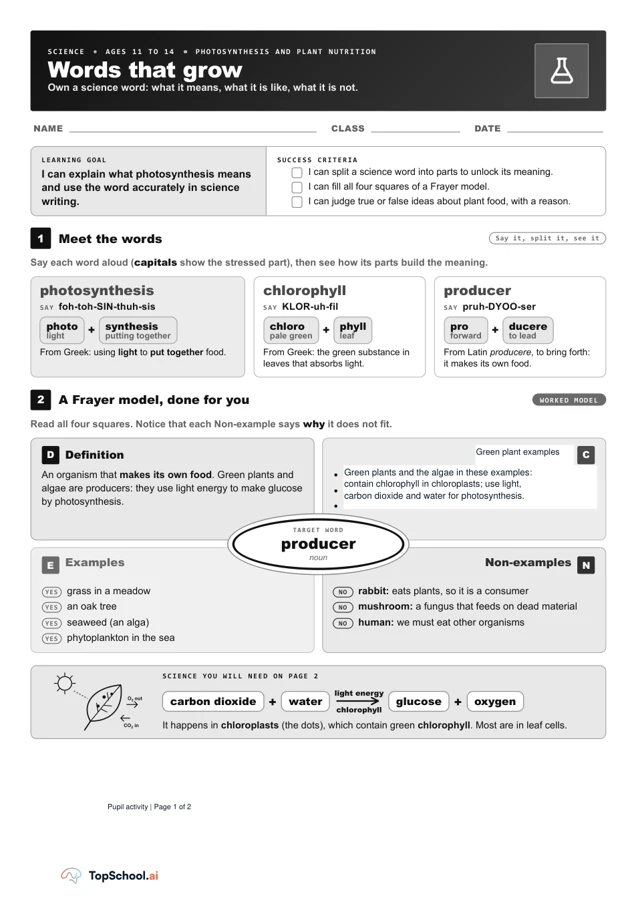
Words that grow: Frayer model for photosynthesis
Read the word parts and the worked producer model. Ask why the rabbit is a non-example before pupils sort the photosynthesis situations on page two.
Explore resource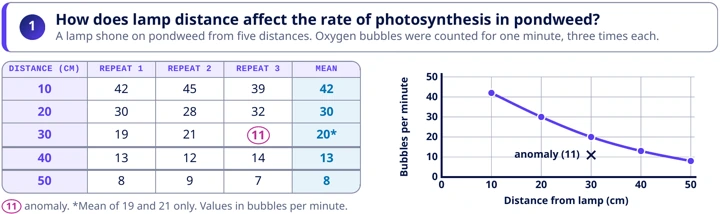
Pondweed and light: CER writing frame
Read the investigation prompt and inspect the table before drafting. The 30 cm row includes an 11-bubble result marked as an anomaly; the printed mean of 20 uses the other two repeats.
Explore resourceIdeas to try with your class
Sample teaching perspectives on what to try, what to adapt and what to watch for.
Meet The Creators
Meet the creators whose teaching interests connect with this template. Find an approach to try with your class.
Sarah Whitcombe
Mangroves, reefs and tropical ecology give us plenty to investigate, so I look for ways to connect the syllabus with what pupils can observe around them.
Meet the creator
Dang Thi Thao
I look for ways to make instructions explicit, check understanding without putting anyone on the spot and connect a new idea to examples the group can recognise.
Meet the creator
Steady Marker
Three controls feed a single lowest-input index, so the most teachable move is the comparison between changing a higher input and changing the tied minimum. The screen’s “limiting” question needs pupils to explain the rule, not just name a button.
Step by Step
This fits a lesson after light, carbon dioxide and water are familiar. Set the controls equal, alter one, then ask what still caps the index; that sequence makes the tie case visible before pupils discuss what a real plant model would need.
Five More Minutes
A three-column record of the light, CO₂ and water settings would reduce slider-memory demands. Keeping two controls fixed also helps pupils link one input change to the displayed index without treating the animation as biological evidence.
Reread Reminder
The percentages and 0 to 60 index are illustrative, with temperature fixed and other factors absent. A follow-on investigation should compare the model’s prediction with evidence about plants and state clearly which conditions the screen cannot represent.