A worksheet needs room for the answer
Make room for the drawing, working and explanation you want pupils to show.
On this page4 sections
A question can look straightforward until you try to write the answer in the space provided. Shading a fraction, drawing a graph and explaining a choice each need a different kind of room.
When you’re choosing a worksheet for your class, it’s natural to focus on the questions. The space underneath deserves a look too. Think about what you want pupils to put on the page, then consider whether the layout gives them room to do it.
Start with the answer you want to see
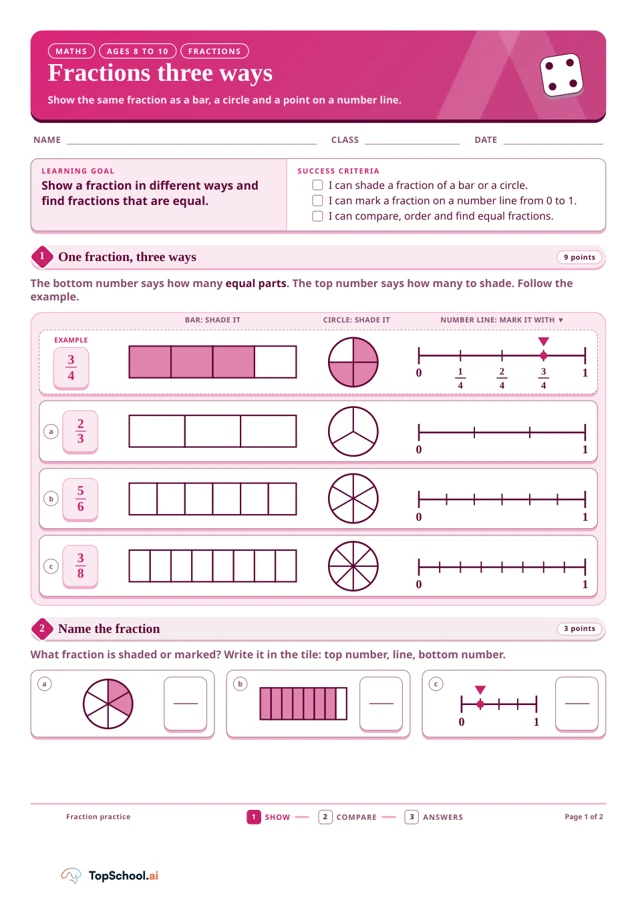
A small box may be all a pupil needs to write a fraction. Showing that fraction on a number line is a different task: they need to find the right position and make a clear mark. The space has to suit the answer.
You can see this in Fractions three ways: show, compare and share. Pupils shade bars and circles, mark number lines and write fractions in tiles. As you look through it, picture your pupils working on each task. Will they have room to make their marks clear and write the numbers at a comfortable size?
Give the explanation room as well
Later in the same worksheet, Kit claims that one third is greater than one half because three is greater than two. Pupils are asked whether Kit is right and to explain why, with lines provided for their answer.
That explanation needs more room than a comparison symbol. The teacher notes explain why one third is less than one half, using equal-sized wholes. You might want pupils to refer to the fraction wall as they explain this. Thinking through the answer yourself helps you judge whether the writing space suits the explanation you want from your class.
Leave room for a different kind of answer
The same idea carries over to graphing. In Birds at our bird feeder: collect and graph data, pupils move from recording frequencies to drawing a bar chart, using a scale of two birds per square. Later, they give two reasons why the numbers might change the following week.
A number can fit into a small gap. A chart needs a grid that works with its scale, while two reasons need room for two ideas. Looking at those answers side by side makes it easier to judge what each part of the page is asking pupils to do.
Try the page before you print
Before sharing a worksheet, work through it at the size you plan to use. Keep the teacher notes nearby and allow for your pupils’ handwriting, drawings and any support they need. If an answer refers to a model on another page, think about how pupils will keep it in view.
PhET’s activity-sheet guidance offers a related suggestion for simulation activities: leave open space for observations and keep wording in tables to a minimum. It is a useful reminder to leave room for what pupils will add to the page.
If the difficulty lies in the wording, you can also make the instructions clearer while keeping the learning goal. Reading the question and trying the answer together gives you a practical way to decide whether a worksheet is ready for your class.