
Study and learning skills
What? So what? Now what? enrichment reflection
For Years 12 to 13 students, describe an enrichment experience, analyse what it taught you and set a specific next action linked to that learning.
Read the material
For Years 12 to 13 students, describe an enrichment experience, analyse what it taught you and set a specific next action linked to that learning.
Pupil worksheet. Use the preview for diagrams and layout.
Page 1
What? So what? Now what? enrichment reflection
Pupil activity
Audience: Years 12 to 13 students
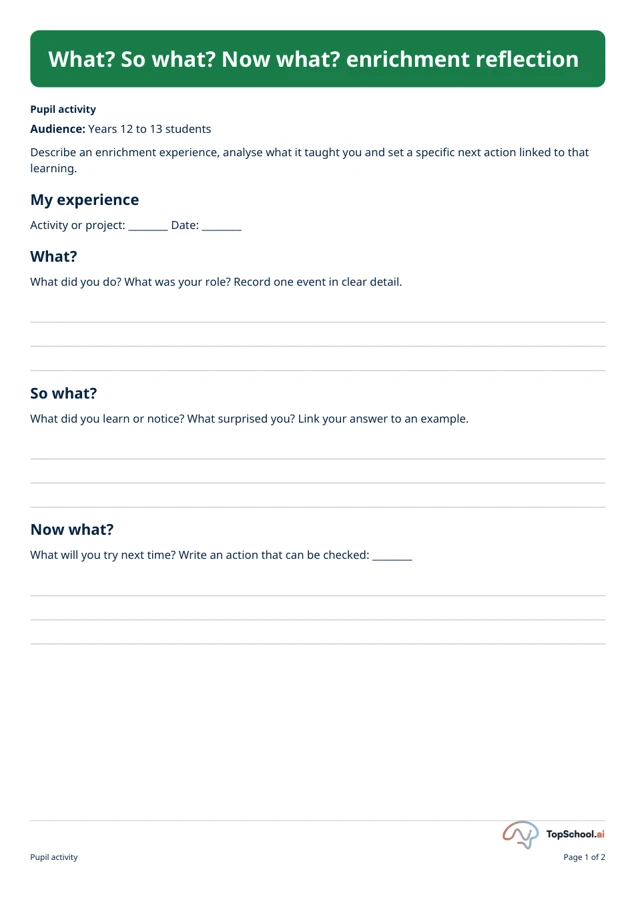
Describe an enrichment experience, analyse what it taught you and set a specific next action linked to that
learning.
My experience
Activity or project: ________ Date: ________
What?
What did you do? What was your role? Record one event in clear detail.
So what?
What did you learn or notice? What surprised you? Link your answer to an example.
Now what?
What will you try next time? Write an action that can be checked: ________
Pupil activity
Page 1 of 2
Page 2
What? So what? Now what? enrichment reflection
Skill evidence
Skill
Evidence: what I did
Next practice step
Teamwork
Communication
Problem solving
Resilience
Pupil activity
Page 2 of 2
A teaching sequence
Describe an enrichment experience, analyse what it taught you and set a specific next action linked to that learning.
Describe the enrichment event and your role
What? Record what you did and your role.
Which specific event detail belongs in What?
Explain learning through an example
So what? Explain what you learned or noticed, with one example.
What supports the reflection rather than merely describing the activity?
Choose a small action and review point
Now what? Write a small next action and a date or trigger.
When or after what trigger will you try the next step?
Record skill evidence and practice
For each skill, record one piece of evidence and one next practice step.
What did you do, and what concrete practice step follows from it?
Before you teach
Look for the thinking behind an answer, choose the support your class needs and leave room for an independent response.
What to look for
Each skill row should name an event or action as evidence and a specific next step. For example, “asked the group to compare two plans” is clearer than “good communication”.
Give a little support
Offer “I noticed _____”, “This mattered because _____” and “Next time I will _____” as frames.
Take the idea further
Compare two experiences and identify a skill used in a new way.
Things to keep in mind
This is a reflection aid, not an assessment of programme requirements. Avoid recording unnecessary sensitive personal details.
Keep the idea. Make it yours.
Bring your topic, learning goal and class context to PLAI™, then review what you create.
Ideas to try with your class
Sample teaching perspectives on what to try, what to adapt and what to watch for.
Meet The Creators
Meet a creator whose teaching interests connect with this template.

Chalk & Chai
This two-page form for Years 12 and 13 asks for one enrichment experience, what was learned and a checkable next action. The skill table separates evidence of teamwork, communication, problem solving and resilience from the next practice step.
Book and Biscuit
The narrower format suits a brief review of a named activity or project, with a date and role before analysis. It complements longer reflection work by asking pupils to connect learning to a future action without a full narrative.
Chalk Dust & Checklists
A pupil can start with the experience and date, then add one event as evidence before naming what it taught them. Completing the skill table after the main reflection may help identify a next step tied to a specific example.
Bright Margins
A written reflection is not a verified assessment of transferable skills. Use the evidence column to anchor the pupil’s account and agree a next practice step, rather than treating a checked box as proof of competence.