
Computing
Test and improve a working school-garden quiz
For Year 3 Computing, test a working three-question garden quiz, record what happens against clear criteria, gather role-only feedback and plan one improvement to test next.
Read the material
For Year 3 Computing, test a working three-question garden quiz, record what happens against clear criteria, gather role-only feedback and plan one improvement to test next.
Printable testing and evaluation record. Use the preview for diagrams and layout.
Page 1
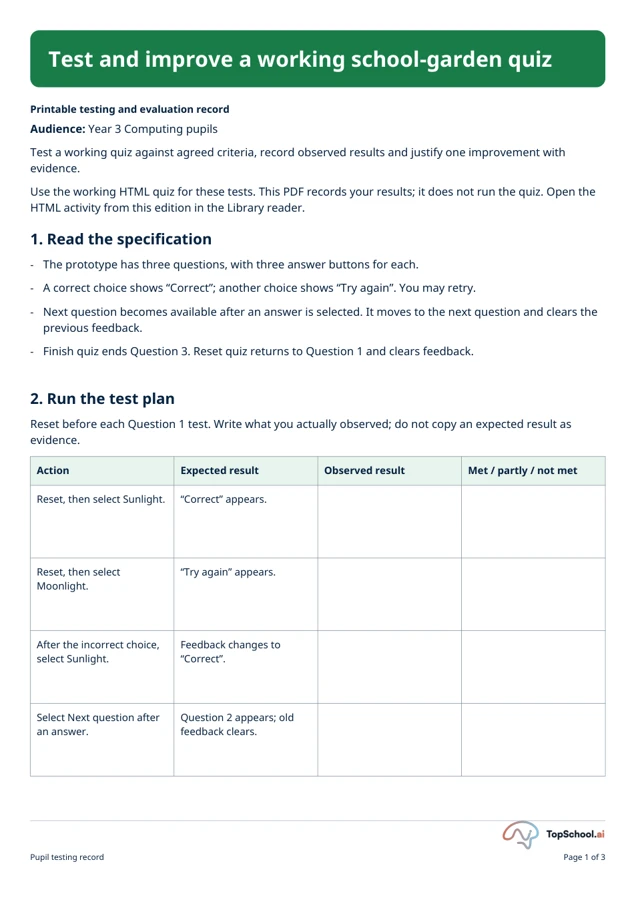
Test and improve a working school-garden quiz
Printable testing and evaluation record
Audience: Year 3 Computing pupils
Test a working quiz against agreed criteria, record observed results and justify one improvement with
evidence.
Use the working HTML quiz for these tests. This PDF records your results; it does not run the quiz. Open the
HTML activity from this edition in the Library reader.
1. Read the specification
-
The prototype has three questions, with three answer buttons for each.
-
A correct choice shows “Correct”; another choice shows “Try again”. You may retry.
-
Next question becomes available after an answer is selected. It moves to the next question and clears the
previous feedback.
-
Finish quiz ends Question 3. Reset quiz returns to Question 1 and clears feedback.
2. Run the test plan
Reset before each Question 1 test. Write what you actually observed; do not copy an expected result as
evidence.
Action
Expected result
Observed result
Met / partly / not met
Reset, then select Sunlight.
“Correct” appears.
Reset, then select
Moonlight.
“Try again” appears.
After the incorrect choice,
select Sunlight.
Feedback changes to
“Correct”.
Select Next question after
an answer.
Question 2 appears; old
feedback clears.
Pupil testing record
Page 1 of 3
Page 2
Test and improve a working school-garden quiz
Action
Expected result
Observed result
Met / partly / not met
Answer Question 2, go to
Question 3, answer and
select Finish quiz.
“Quiz complete” appears;
no next-question button
remains.
Select Reset quiz from the
completed quiz.
Question 1 returns with no
feedback; Next is
unavailable until an
answer.
3. Evaluate against criteria
Circle met, partly met or not met and give a result that supports each judgement. These are classroom
prompts, not a certified product standard.
Criterion
How to check it
Evidence and verdict
Function: answers, retry and
navigation work.
Use your six functional tests.
Clarity: question and button wording
are understandable.
Ask the agreed testers what was
clear or awkward.
Access: controls can be reached and
used on the agreed device.
Try Tab and Enter or Space with
teacher support.
Feedback: a tester can see what
happened after a choice.
Compare correct and incorrect
feedback.
4. Ask two testers
Follow the teacher’s agreed consent and feedback arrangements. Record roles, such as pupil tester or
teacher tester, rather than names.
Pupil testing record
Page 2 of 3
Page 3
Test and improve a working school-garden quiz
Tester role
What was easy or
awkward?
Which part worked best?
What one change would
help?
5. Annotate and evaluate
Sketch or describe the quiz interface. Label one strength (+) and one improvement (→), each linked to a result
or tester comment.
Sketch or description: ________
It met the ______ criterion because test ______ showed ______.
It did not fully meet / still needs checking against ______ because ______.
A tester’s comment / my test result was ______. It supports / differs from ______.
To improve it, I would ______ so that ______.
6. Plan an iteration and retest
Proposed change
Evidence for it
Retest action
Expected result
Your proposed change is a design idea. The supplied quiz has not been edited by this plan. Test a revised
build only after it actually exists.
Pupil testing record
Page 3 of 3
Page 1
Test and improve a working school-garden quiz
Teacher key and guidance supporting this exact edition
Teacher checks and use notes
Question 1: Sunlight. Question 2: Roots. Question 3: Leaves. The program shows feedback, allows retry,
advances after a choice and resets without saving or sending data. Check device access, reading demand and
the agreed testers before use. A met/partly met/not met verdict needs recorded evidence. No real pupil test
is claimed by this packet.
Teacher companion
Page 1 of 1
A teaching sequence
Test a working quiz against agreed criteria, record observed results and justify one improvement with evidence.
Model one observed quiz test
Read the specification and model resetting Question 1, choosing Sunlight and recording the observed feedback. Explain why the expected result alone does not establish a passed test.
Why is an expected result alone insufficient to call a test passed?
Test retry, navigation, finish and reset
Work through the test table, including an incorrect answer, retry, next-question navigation and reset. Record what happened and decide whether each criterion was met, partly met or not met.
What happened in the actual HTML activity for each action?
Compare two testers' permitted feedback
Let two agreed testers try the quiz and record their roles and comments about feedback and buttons. Compare their comments with the functional results.
Which role-based comment agrees with or differs from a functional result?
Propose an improvement and retest
Sketch or describe one proposed improvement, explain which result supports it and write a retest with an expected result. The supplied program stays unchanged; a proposed improvement is not a completed new build.
What evidence supports the change, and what would the later retest expect?
Before you teach
Look for the thinking behind an answer, choose the support your class needs and leave room for an independent response.
What to look for
A useful record distinguishes expected and observed results: for example, after resetting to Question 1 and selecting Moonlight, a tester may record that “Try again” appeared. Ask, “Which action produced that result, and which criterion did it test?” A justified improvement names evidence, such as a tester finding the next button unclear, and describes a retest.
Give a little support
Model the first test with a partner. Let one pupil operate the quiz while another dictates or records what happened, then swap roles. Use one criterion at a time and accept a short evidence sentence before the full evaluation.
Take the idea further
Test keyboard operation with Tab and Enter or Space. Propose a clearer label or feedback message, describe a revised design, then explain the test that would show whether the change helped. The packet does not implement pupils’ proposed revisions.
Things to keep in mind
This quiz is a supplied example for testing and evaluation, not a science assessment or a validated product standard. Agree the reading demand, device access and feedback arrangements before use. Record tester roles rather than names. The program does not save or send answers or comments.
Keep the idea. Make it yours.
Bring your topic, learning goal and class context to PLAI™, then review what you create.
Ideas to try with your class
Sample teaching perspectives on what to try, what to adapt and what to watch for.
Meet The Creators
Meet a creator whose teaching interests connect with this template.

Helpful Highlighter
This three-page Year 3 record directs pupils to open the working HTML quiz in the Library reader, then test it against criteria and record observed results. The PDF stores the evidence; it does not run the quiz.
Book and Biscuit
The activity connects an agreed specification to actual tests and asks pupils to justify one improvement from what they observe. Separating the working activity from the printable record makes the two parts of the task clear.
Tea Break Notes
Before each test, have the pupil state the expected result, operate the corresponding control in the HTML quiz and then write what happened. A teacher can scribe the exact observed message while the pupil makes the comparison.
Margin Note
This edition depends on access to its working HTML companion. If that companion is unavailable or has changed, the PDF alone cannot supply test results; verify the current activity before using the record.