
Maths
Parabola explorer: quadratic and sine graphs
Explore quadratic and sine graphs by changing coefficients and comparing the equation, curve and fact readouts. The browser activity starts with a quadratic demonstration; touching a control takes over. A separate companion explains roots, turning points, sine parameters and the limits of the rounded, bounded display.
A quadratic in the graph window. Open the activity to change the coefficients and inspect the readout.
Read the complete materialRead the material
Explore quadratic and sine graphs by changing coefficients and comparing the equation, curve and fact readouts. The browser activity starts with a quadratic demonstration; touching a control takes over. A separate companion explains roots, turning points, sine parameters and the limits of the rounded, bounded display.
Interactive activity. Use the preview for diagrams and layout.
Resource text
Maths · Graphs
Shape the parabola
Bounded graph; values rounded to 0.1. Sine uses radians and b > 0.
Auto demo · touch anything to take over
a
b
c
Page 1
Teacher companion
Parabola explorer: quadratic and sine graphs
Quadratic checks
a=b=c=0: y=0 and every real number is a root. a=b=0,c≠0: constant nonzero, no roots. a=0,b≠0: linear, one
root−c/b. For nonzeroa, positive discriminant gives two real roots, zero one repeated root and negative
none. Turning point exists only for nonzeroa.
Sine checks
y=a sin(bx+c), radians. Amplitude|a|, angular frequencyb, period2π/b, horizontal phase shift−c/b. This tool
bounds a to0.5–4 and b to0.3–3; it does not illustrate zero/negativeb. Readouts round to0.1. Off-screen
roots/features may exist beyond the finite graph window.
Use and review
Change one coefficient, predict, then compare equation, graph and facts. User actions synchronise the
coefficients immediately. Compare rounded readouts with exact hand calculations. This guide does not
replace the interactive HTML.
Teacher companion | Page 1 of 1
A teaching sequence
Pupils should predict a graph change, vary one coefficient and explain the result using both the equation and a feature. They should recognise linear or constant cases when the quadratic coefficient is zero and check rounded readouts against exact working where appropriate.
A quadratic in the graph window. Open the activity to change the coefficients and inspect the readout.
Read the complete materialVary one quadratic coefficient
In quadratic mode, change one coefficient and compare the equation, intercept and turning-point or root readouts. Ask pupils which feature changed and which stayed the same.
Which graph feature changed while the other coefficients stayed fixed?
Test zero and constant cases
Set a to zero and inspect linear or constant cases. Compare y = 0 with a nonzero constant and discuss why the former has every real number as a root while the latter has none.
When a and b are zero, how does c decide whether there are roots?
Explore the sine parameters
Switch to sine mode and vary one parameter. Compare amplitude, period and phase shift with the curve, using radians and the tool’s stated positive b range.
How does the curve reflect the period readout in radians?
Check an exact value
Check one readout by hand and discuss rounding to 0.1. Revisit any conclusion based on the visible window alone, asking whether a feature could exist off screen.
Could the bounded graph window hide a feature beyond its edges?
Before you teach
Look for the thinking behind an answer, choose the support your class needs and leave room for an independent response.
What to look for
A useful response distinguishes a genuine quadratic from the a = 0 case. For sine, it relates the period to 2π/b and phase shift to −c/b rather than calling c the shift itself. If a pupil reports no roots because none are visible, compare the root readout and exact working before concluding.
Give a little support
Record a, b and c before and after each change, circling only the altered value. Begin with an intercept comparison and one prediction sentence. Keep the equation beside the graph and use the companion to separate root count from the number of crossings visible on screen.
Take the idea further
Choose a displayed graph feature and calculate its exact value from the coefficients. Compare that result with the rounded readout, then construct a second coefficient set for a contrasting case. Explain whether a difference comes from the mathematics, rounding or the finite viewing window.
Things to keep in mind
The graph window is bounded and facts are rounded to 0.1. Sine uses radians and restricts b to positive values.
Keep the idea. Make it yours.
Bring your topic, learning goal and class context to PLAI™, then review what you create.
Another starting point
Explore a different teaching task from this selection.
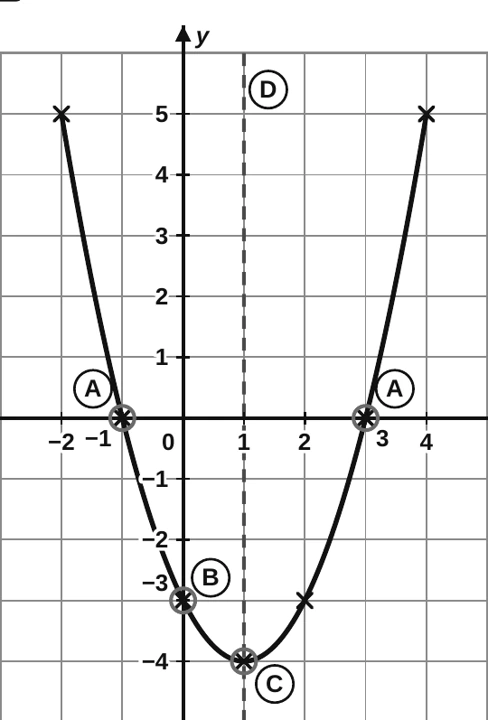
Investigate a quadratic: graph and features
Follow the worked table for y = x² − 2x − 3, then trace how each table value becomes a point.
Explore resourceIdeas to try with your class
Sample teaching perspectives on what to try, what to adapt and what to watch for.
Meet The Creators
Meet a creator whose teaching interests connect with this template.

Organised Pile
The quadratic and sine modes share coefficient controls but ask for different interpretations. A pupil can compare equation and graph in either mode; the rounded feature readouts and bounded window mean a missing visible root is not proof that no root exists.
Quietly Curious
A useful lesson sequence holds two coefficients steady while one changes, then checks the equation against a feature. The a = 0 cases deserve their own pause because the display becomes linear or constant rather than remaining a quadratic.
Thoughtful Pause
Present one mode at a time and keep a written record of the coefficient value beside the predicted feature. For sine, keep the radian convention in view and support pupils to compare the rounded period with exact working.
One Last Sticky Note
The graph window is bounded, values are rounded to one decimal place, and sine frequency is restricted to positive b. Any conclusion about roots or turning points should be checked beyond what happens to fit on screen.