
Computing
Debug a coordinate programme
For Year 3 Computing pupils, run a short coordinate programme on paper, compare its actual and expected result, diagnose the sign error and correct one line.
Read the material
For Year 3 Computing pupils, run a short coordinate programme on paper, compare its actual and expected result, diagnose the sign error and correct one line.
Pupil worksheet. Use the preview for diagrams and layout.
Page 1
Debug a coordinate programme
Pupil activity
Audience: Year 3 Computing pupils
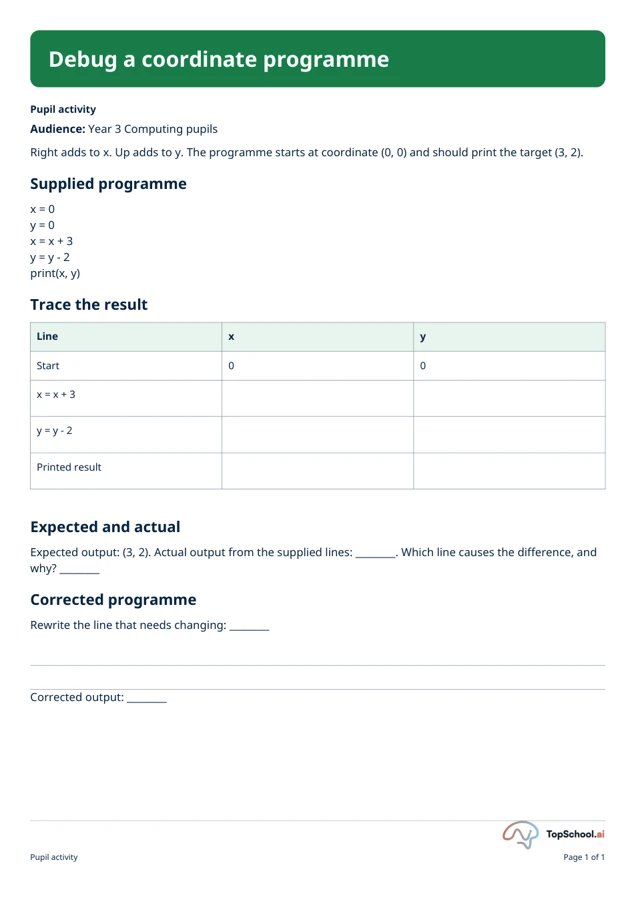
Right adds to x. Up adds to y. The programme starts at coordinate (0, 0) and should print the target (3, 2).
Supplied programme
x = 0
y = 0
x = x + 3
y = y - 2
print(x, y)
Trace the result
Line
x
y
Start
0
0
x = x + 3
y = y - 2
Printed result
Expected and actual
Expected output: (3, 2). Actual output from the supplied lines: ________. Which line causes the difference, and
why? ________
Corrected programme
Rewrite the line that needs changing: ________
Corrected output: ________
Pupil activity
Page 1 of 1
Page 1
Debug a coordinate programme
Teacher key and guidance supporting this exact edition
Teacher answer and corrected code
The actual output is (3, -2). The programme subtracts 2 from y, which moves down because up is defined as
positive y. Corrected code: x = 0; y = 0; x = x + 3; y = y + 2; print(x, y). The corrected output is (3, 2). This is a
logic error: the code runs but gives a result different from the target.
Teacher companion
Page 1 of 1
A teaching sequence
Trace a short coordinate programme, compare its actual and expected output, diagnose a logic error and write a corrected programme.
Trace expected and actual coordinates
Read the supplied Python code and trace x and y after each line. Compare the printed result with the target coordinate.
What happens to y after the supplied subtraction line?
Locate the logic error
Name the line and explain the logic error.
Which operation conflicts with moving up to the target?
Correct and trace again
Write corrected code and check its output.
Does your revised line produce the target (3, 2)?
Before you teach
Look for the thinking behind an answer, choose the support your class needs and leave room for an independent response.
What to look for
The supplied code prints (3, -2), but the goal is (3, 2). The y line subtracts 2 instead of adding 2. The corrected programme prints (3, 2).
Give a little support
Use a counter on a grid and say each instruction aloud.
Take the idea further
Add a second route with a repeated step and ask whether it is needed.
Things to keep in mind
This is an unplugged tracing task. It does not run code in a live IDE or test a robot.
Keep the idea. Make it yours.
Bring your topic, learning goal and class context to PLAI™, then review what you create.
Ideas to try with your class
Sample teaching perspectives on what to try, what to adapt and what to watch for.
Meet The Creators
Meet a creator whose teaching interests connect with this template.

Extra Page
The one-page Year 3 task defines right as increasing x and up as increasing y, then shows a program intended to reach (3, 2). Its subtraction line moves y in the wrong direction, which pupils must trace and correct.
Little Lightbulbs
The printed trace table separates start, each assignment and final output before asking which line caused the difference. That links coordinate direction to program logic rather than treating the task as a syntax hunt.
Thoughtful Pause
Model the starting point (0, 0), then fill x and y after each line. Pupils can follow the coordinate movement on a grid before rewriting the line, giving a visual check on why the expected y-value is positive two.
Page-Turner Planner
This is a single deliberately faulty program and does not assess broader debugging skill. Keep the stated coordinate convention beside the trace; reversing the meaning of “up” would change the expected correction.