
Computing
Bug hunt: fix Python errors
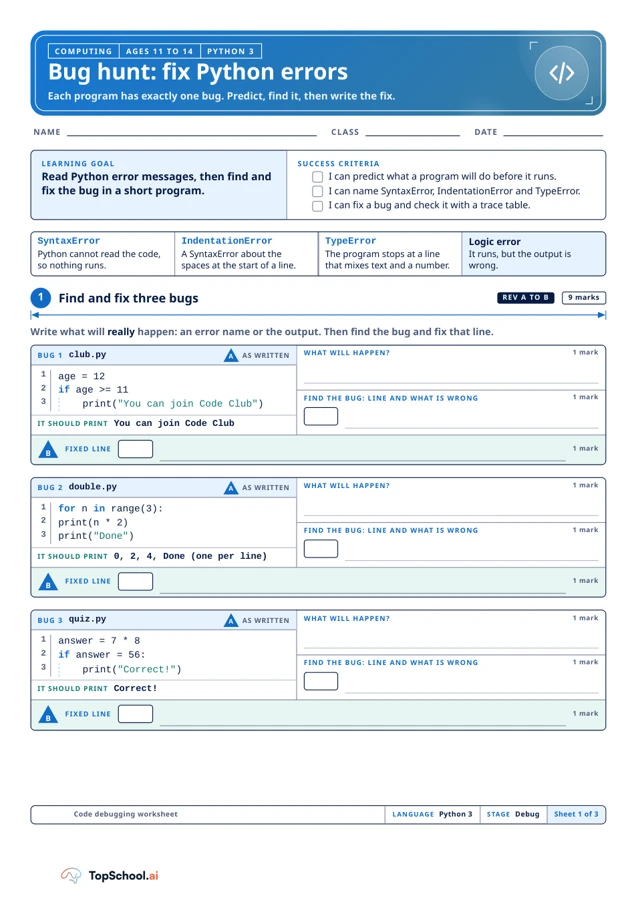
Practise predicting, locating and correcting bugs in short Python 3 programs. The A4 worksheet moves from syntax and indentation to type and logic errors, then asks pupils to trace a loop and diagnose a final incorrect maximum.
Read the material
Practise predicting, locating and correcting bugs in short Python 3 programs. The A4 worksheet moves from syntax and indentation to type and logic errors, then asks pupils to trace a loop and diagnose a final incorrect maximum.
Complete resource. Use the preview for diagrams and layout.
Page 1
NAME
CLASS
DATE
LEARNING GOAL
Read Python error messages, then find and
fix the bug in a short program.
SUCCESS CRITERIA
I can predict what a program will do before it runs.
I can name SyntaxError, IndentationError and TypeError.
I can fix a bug and check it with a trace table.
SyntaxError
Python cannot read the code,
so nothing runs.
IndentationError
A SyntaxError about the
spaces at the start of a line.
TypeError
The program stops at a line
that mixes text and a number.
Logic error
It runs, but the output is
wrong.
Write what will really happen: an error name or the output. Then find the bug and fix that line.
BUG 1 club.py
AS WRITTEN
1
age = 12
2
if age >= 11
3
    print("You can join Code Club")
IT SHOULD PRINT You can join Code Club
WHAT WILL HAPPEN?
1 mark
FIND THE BUG: LINE AND WHAT IS WRONG
1 mark
FIXED LINE
1 mark
BUG 2 double.py
AS WRITTEN
1
for n in range(3):
2
print(n * 2)
3
print("Done")
IT SHOULD PRINT 0, 2, 4, Done (one per line)
WHAT WILL HAPPEN?
1 mark
FIND THE BUG: LINE AND WHAT IS WRONG
1 mark
FIXED LINE
1 mark
BUG 3 quiz.py
AS WRITTEN
1
answer = 7 * 8
2
if answer = 56:
3
    print("Correct!")
IT SHOULD PRINT Correct!
WHAT WILL HAPPEN?
1 mark
FIND THE BUG: LINE AND WHAT IS WRONG
1 mark
FIXED LINE
1 mark
Code debugging worksheet
LANGUAGE Python 3
STAGE Debug
Sheet 1 of 3
COMPUTING
AGES 11 TO 14
PYTHON 3
Bug hunt: fix Python errors
Each program has exactly one bug. Predict, find it, then write the fix.
1
Find and fix three bugs
REV A TO B
9 marks
A
B
A
B
A
B
Page 2
BUG 4 total.py
AS WRITTEN
1
total = 0
2
for n in range(1, 10):
3
    total = total + n
4
print(total)
IT SHOULD PRINT 55, the total of 1 to 10
WHAT WILL HAPPEN?
1 mark
FIND THE BUG: LINE AND WHAT IS WRONG
1 mark
FIXED LINE
1 mark
BUG 5 score.py
AS WRITTEN
1
name = "Sam"
2
score = 15
3
print(name + " scored " + score)
IT SHOULD PRINT Sam scored 15
WHAT WILL HAPPEN?
1 mark
FIND THE BUG: LINE AND WHAT IS WRONG
1 mark
FIXED LINE
1 mark
A trace table records each variable every time it changes. Two rows are done for you. Fill in the rest.
TRACE evens.py
1
total = 0
2
for n in range(1, 5):
3
    total = total + n * 2
4
print(total)
Q
Why does n never become 5?
LINE
n
total
OUTPUT
1
-
0
3
1
2
3
3
3
4
BUG 6 biggest.py
1
biggest = 0
2
for n in [3, 9, 4]:
3
    if n < biggest:
4
        biggest = n
5
print(biggest)
GO FURTHER: A BUG WITH NO ERROR MESSAGE
It should print 9, the biggest number, but it prints 0. Write the
bug's line number in the box and the fixed line beside it.
Code debugging worksheet
DEBUGGED BY
REV
Sheet 2 of 3
COMPUTING
AGES 11 TO 14
PYTHON 3
Two more bugs, then trace a loop
2
Find and fix two more bugs
6 marks
A
B
A
B
3
Trace the loop
PART T
5 marks
B
A teaching sequence
Predict program behaviour, identify and explain one bug per snippet, and use a trace table to follow changing values.
Predict and find a bug
For each short program, write the expected error or output before locating the bug and recording a fixed line.
What will happen as the program is written, before the fix?
Name the error type
Use the error panel to distinguish syntax, indentation, type and logic problems; explain what prevents the program or changes its result.
Does the problem stop Python reading the code or change a running result?
Trace the loop values
Complete the trace table for the loop, recording n and total each time and explaining why the stop value is excluded.
Why does n never become the stop value in range(1, 5)?
Test the largest-number condition
Diagnose the largest-number program and test the proposed condition against each list value. Test the fix by tracing or running the Python 3 code.
Does your corrected condition update biggest for each value in [3, 9, 4]?
Before you teach
Look for the thinking behind an answer, choose the support your class needs and leave room for an independent response.
What to look for
Check each predicted behaviour and fix by running or tracing the Python 3 code separately. For the trace, the loop visits 1 to 4 and the total is 20; for the maximum bug, the comparison must retain a value larger than the current maximum. Ask pupils to explain how they know.
Give a little support
Work through one bug as a class and give pupils a printed code copy with line numbers. Provide a trace table with some rows started and let pupils test a fix in a supervised Python 3 environment if available.
Take the idea further
Ask pupils to write a new buggy snippet with one clear fault, swap it with a partner and verify that the predicted error matches Python 3. Include a trace so logic mistakes can be distinguished from runtime errors.
Things to keep in mind
Each program is intended to contain one bug. Test every correction and expected output in Python 3 before classroom use; the worksheet itself does not run code.
Keep the idea. Make it yours.
Bring your topic, learning goal and class context to PLAI™, then review what you create.
Ideas to try with your class
Sample teaching perspectives on what to try, what to adapt and what to watch for.
Meet The Creators
Meet a creator whose teaching interests connect with this template.
Chalk & Chai
The Python worksheet asks pupils to predict, locate one bug, write a corrected line and compare output with an expected result. Its examples distinguish syntax, indentation, type and logic errors, then introduce a trace table for changing values.
Calm Table
For ages 11 to 14, the three initial snippets include a missing colon, indentation and equality-check problems; later items extend the debugging practice. “Each program has exactly one bug” narrows the search and should remain visible during the exercise.
Step by Step
Have pupils trace the supplied code before editing, recording the line and actual behaviour. That separates predicting execution from proposing a fix, while the named error categories give a vocabulary for explaining why a program stops or behaves differently.
Helpful Highlighter
The worksheet covers selected short Python examples, not debugging in every program. Verify each expected output against the printed code and Python 3 context before using the answer key; a trace table does not replace running a test.