
Computing
Algorithm flowchart and pseudocode canvas
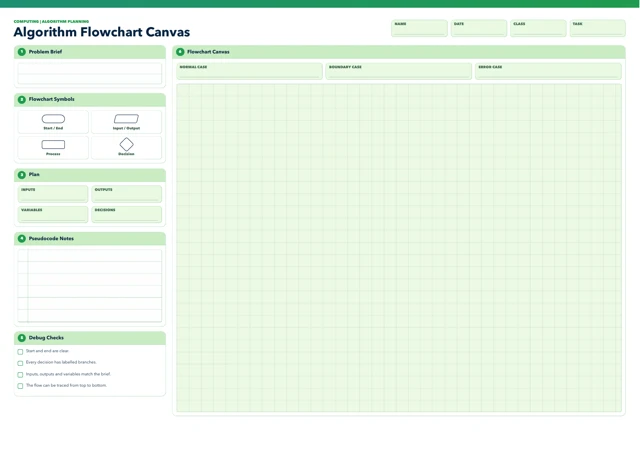
Plan an algorithm by relating a problem brief to its inputs, outputs, variables and decisions. An A3 planning canvas combines a symbol reference, pseudocode notes and space to trace normal, boundary and error cases before a flowchart is drawn.
Read the material
Plan an algorithm by relating a problem brief to its inputs, outputs, variables and decisions. An A3 planning canvas combines a symbol reference, pseudocode notes and space to trace normal, boundary and error cases before a flowchart is drawn.
Pupil flowchart canvas, A3. Use the preview for diagrams and layout.
Page 1
COMPUTING | ALGORITHM PLANNING
NAME DATE CLASS TASK
Algorithm Flowchart Canvas
1 Problem Brief 6 Flowchart Canvas
NORMAL CASE BOUNDARY CASE ERROR CASE
2 Flowchart Symbols
Start / End Input / Output
Process Decision
3 Plan
INPUTS OUTPUTS
VARIABLES DECISIONS
4 Pseudocode Notes
5 Debug Checks
Start and end are clear.
Every decision has labelled branches.
Inputs, outputs and variables match the brief.
The flow can be traced from top to bottom.
A teaching sequence
Represent a problem-solving algorithm using suitable flowchart symbols and pseudocode notes, then check its branches against normal, boundary and error cases.
Define input and result
Define the problem in the brief. Ask pupils to describe what the algorithm must receive and what result it must produce.
What must the algorithm receive, and what must it produce?
Choose symbols and variables
Identify inputs, outputs, variables and decisions in the planning panel; use the symbol guide to choose start/end, input/output, process or decision shapes.
Which decision needs two labelled branches?
Draw the normal path
Add pseudocode notes, then draw the normal path and label both branches at each decision.
Do your pseudocode and flowchart describe the same sequence?
Trace edge and error cases
Trace normal, boundary and error cases using the debug checklist. Check endpoints, branch labels and matching variables before deciding whether the flow works.
What happens when the value is exactly at the limit?
Before you teach
Look for the thinking behind an answer, choose the support your class needs and leave room for an independent response.
What to look for
Look for a traceable path from start to end, labelled decision branches and inputs, outputs and variables that fit the brief. Ask pupils to trace an edge case: “What happens when the value is exactly at the limit?” A neat diagram does not establish that the algorithm works until its steps are tested.
Give a little support
Provide a partly completed brief or a short list of possible inputs and outputs. Model one decision with both outcomes labelled, and let pupils trace the algorithm with a small set of sample values before drawing the full canvas.
Take the idea further
Have pupils translate the checked flowchart into pseudocode or code, then test it with chosen normal, boundary and error inputs. Ask which test exposed an assumption and how the plan should change. The canvas itself does not supply a programming environment.
Things to keep in mind
The canvas supports planning but is not a coding environment or worked answer. Teachers need to supply a suitable problem brief and judge whether each algorithm behaves correctly.
Keep the idea. Make it yours.
Bring your topic, learning goal and class context to PLAI™, then review what you create.
Ideas to try with your class
Sample teaching perspectives on what to try, what to adapt and what to watch for.
Meet The Creators
Meet the creators whose teaching interests connect with this template. Find an approach to try with your class.

Daniel Lee
I teach debugging through working artefacts: pupils compare what they expected with what happened, change one part at a time and explain what they tested and improved.
Meet the creator
Steven Marsh
I value build logs that capture a design choice, its reason and what a student may reconsider, adapting the record to the evidence each practical or technical task needs.
Meet the creator
Steady Marker
The canvas separates problem brief, inputs and outputs, variables, decisions, pseudocode notes, flowchart and debug checks. The normal, boundary and error cases give pupils concrete routes for tracing whether each decision branch is labelled and reachable.
Gentle Reminder
Use the brief first, then have pupils identify data and decisions before drawing symbols. Checking a boundary value and an error case after the ordinary route makes debugging part of the plan instead of an afterthought.
Coffee Before Copies
A partially completed input/output table can focus attention before the larger flowchart area is used. Pupils may explain a branch verbally or trace it with a finger, then record the same logic in pseudocode notes.
Book and Biscuit
The canvas structures planning but supplies no specific algorithm or correctness test. A completed diagram needs a named problem and test cases; the three debug labels alone do not show that the chosen cases cover every relevant condition.